

We get it: when you choose to play at an online casino, the final thing you need is a long, complicated sign-up that keeps you from the games. At Spinanga Casino, we’ve cut the account creation process down to about two minutes. That is no marketing exaggeration; it’s the result of watching how real players navigate registration and removing every step that is not essential. In this guide, we will guide you through the entire journey: the precise steps you will take, the documents required later for verification, the security protections that guard your login, and the remedies for the most common obstacles. We also detail why a fast, secure registration is good for both you and the platform. By the time you finish reading, you will know exactly what to expect and how to avoid delays. Our aim is to make your first interaction with Spinanga Casino smooth, transparent, and reassuring, so you can focus on what matters most—enjoying the games. We have crafted the whole thing to be as straightforward as possible, and this article will show you exactly how it works.
Why Quick Registration Is Important for Gambling Site Users
Your free time is limited—you can’t get it back once it’s gone https://spinanga-kazino.com/login/. We are convinced your leisure time should never be wasted on pointless obstacles. Few appreciate completing lengthy applications just to play some blackjack rounds. That’s why we concentrated on quick sign-up without compromising on protection. Whenever a gambling site demands page after page of unnecessary data, it often suggests the casino hasn’t focused in player experience. With Spinanga, we view the registration moment as the first real test of our dependability. A quick two-minute registration demonstrates we value your hours and that our technical systems are sufficiently advanced to manage information gathering efficiently. Beyond the obvious convenience, a concise form lowers the risk you will quit it partway—a frequent annoyance on sites that overcomplicate things. We are also aware many players sign up using mobile devices, where entering text on a tiny display can be tiresome. By keeping only the essential fields and employing intelligent input checks, we guarantee mobile account creation equally quick as desktop. This method does not weaken security; we collect exactly what’s needed for legal requirements and account security, nothing more. The result is a hassle-free beginning that creates a good impression for all that comes next. It is a straightforward formula: less time spent registering means more time playing.
Speed also is important because online casino gaming is often an impulse-driven activity. Consider this: if you’re on a bus or waiting for a friend, you don’t want to spend that time entering your life story. You want to play. Maybe you’ve got a short break—a lunch hour, a commute, a quiet evening—and you want to jump into a live dealer table or a slot session without delay. If registration takes too long, that window closes and the opportunity is lost. We’ve seen that players who complete sign-up quickly are more likely to return, simply because the first experience was enjoyable. A fast process also shows operational competence. It tells you that the casino’s payment processing, game loading, and customer support are likely to be equally responsive. So we don’t treat the two-minute account creation as a gimmick; it’s a core design principle that demonstrates our broader commitment to efficiency. Every field you see on our registration form has been tested for clearness and necessity. We regularly review the flow to keep it lean, even as we add new features or comply with updated regulations. That’s the kind of efficiency we pursue across the whole platform.
Detailed Guide to Opening Your Spinanga Casino Account
The form is designed to be user-friendly, but a brief walkthrough eliminates any guesswork. No hidden fields, no surprise questions. The entire thing is meant to seem like a chat, not an grilling. When you arrive at the Spinanga Casino homepage, look for the “Sign Up” or “Register” button—typically in the top right corner. Click it, and the opening stage starts. You’ll type in your email address and set up a password. The system verifies the email format instantly to spot typos, and a password strength bar displays if your pick is solid. After these two fields, you proceed to the subsequent step: your full name, just as it is displayed on your official ID. This matters because any mismatch can delay the KYC check afterwards. Then you select your date of birth from a simple calendar widget. We employ that to ensure you’re eligible to play, on its own, so there’s no ambiguity.
Step three asks for your country of residence and full address. You’ll pick your country from a dropdown, and the address fields adjust to the typical format for that region. Provide your street, city, and postal code. We also ask for your mobile number with the country code. At this stage, you might see options to select your currency and select a welcome bonus, depending on current promotions. The last step is to approve the terms and conditions and confirm you’re of legal age. We advise actually reading the terms—they detail your rights and obligations. Hit “Create Account,” and the system manages everything in seconds. You’ll receive a confirmation message and get an email with a verification link. Click that link, and your account is live. The whole sequence, from first click to confirmed email, really requires about two minutes when you possess your details ready. We’ve tracked it, and the average player finishes in under two minutes—often closer to 90 seconds.
Detailed Walkthrough of the Registration Form Fields
Email and Password Setup
We put email and password first because they define your unique identity in our system. The email address cannot already be associated to an existing Spinanga account; if it is, you’ll get an immediate notification and can either log in or use a different address. Skip throwaway email services—they can intercept important messages from us. The password field needs at least eight characters, with one uppercase letter, one lowercase, and one number. A strength meter shifts from red to green as you meet each rule, giving you instant feedback. You can toggle “show password” if you want to double-check what you typed. This whole section takes under thirty seconds to complete.
Personal Information and Residence
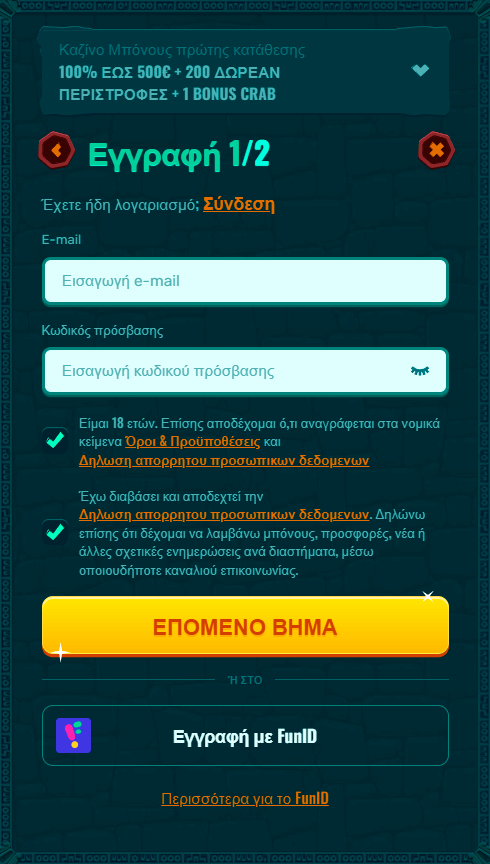
This portion is where accuracy is key most. We ask for first and last name in separate fields to ensure things clear. Middle names are not required unless your ID lists them. For date of birth, a calendar widget allows you to select the year, month, and day efficiently, and it prevents impossible dates automatically. The address section employs a structured layout: pick your country from a list, then enter city, street, and postal code. If your country employs regions or states, an extra dropdown appears. We validate the postal code against typical formats for your country, which minimizes errors. The mobile number field requires the country code prefix—you pick it from a dropdown—then your local number. We won’t call you without permission; the number is for security checks and optional SMS alerts.
Safeguarding Your Login and Securing Your Account
At Spinanga, account security isn’t a one-off setup; it’s a continuous process. Once your account is active, we add several safeguards to keep your login and funds safe. The first and most apparent is the password you created. We store all passwords using strong one-way hashing, so nobody inside the company can see your actual password. But even a strong password can be cracked if you reuse it elsewhere. That’s why we promote two-factor authentication (2FA). Our platform works with authenticator apps like Google Authenticator or Authy. Turn it on, and every login needs a time-sensitive code from your phone—making illegitimate access nearly impossible, even if someone has your password.
We also run automatic security checks that monitor login patterns. If the system detects a sign-in from a new device or an odd location, it might block the attempt and send you an email alert with a verification link. This is called device fingerprinting, and it helps stop account takeovers. These measures might sound intense, but they run quietly in the background so you don’t notice them—until they stop something bad. In your account settings, you can see recent login activity: a list of devices, IP addresses, and timestamps. If something looks off, you can remotely log out all sessions and change your password right away. We also set session timeouts on idle accounts, so if you forget to log out on a shared computer, the system ends the session automatically after a while. For financial transactions, we might ask for an extra confirmation—like a one-time code via SMS or email—depending on the withdrawal method and amount. All data between your browser and our servers travels over TLS 1.3 encryption, the same standard banks use.
Identity Verification and Compliance Requirements
Getting your Spinanga account ready in two minutes is just the initial step of the journey. For cashing out, you’ll need to finish the KYC (Know Your Customer) check. This is mandatory for any regulated casino and demanded by anti-money laundering rules. It’s a bit of paperwork, but we’ve made the upload process as easy as attaching a file to an email. We’ve strived to make KYC as hassle-free as possible by embedding it right into your account interface. When you sign in, you’ll see a verification area where you can submit the documents. Usually, we need a sharp, colour scan of a state-issued ID—passport card, identity card, or driver’s licence. The ID must be current and display your full name, date of birth, and photo. We also request a current proof of address: a service bill, bank statement, or official government letter. The document should be dated within the last three months and display your name and address exactly as you submitted them.
Our compliance team manages verification, and we seek to assess submissions within 24 hours on business days. In practice, many get approved much faster—sometimes within an hour. You’ll get an email once the review is done. If something’s off—a blurry image or an address mismatch—we’ll explain exactly what needs fixing, and you can resubmit for free. We never charge for KYC. Keep in mind: you can deposit and play before verification is complete, but you can’t withdraw any winnings until your documents are approved. That policy protects both you and the casino from fraud. We may ask for extra documents if we need more clarity, like a selfie with your ID or a screenshot of your e-wallet. The whole point is to build a secure environment where every player is verified and protected.
Files Typically Accepted for KYC
To bypass delays, prepare these documents prepared in digital format before you initiate the upload. Acceptable identity documents: a valid passport, a national ID card (both sides if it has two), or a driver’s licence showing your photo and signature. Files should be JPEG, PNG, or PDF, and the whole document must be displayed—no cropped edges. For proof of address, we accept utility bills (electricity, water, gas), bank or credit card statements, or official letters from a government agency. Mobile phone bills could suffice, but a standard utility bill is better. The document must show your name, current address, and a date within the last 90 days. Screenshots of online statements are fine as long as the URL and date are visible. We don’t approve envelopes or handwritten notes. With these files ready, you can finalize the upload in a few minutes and get one step closer to full account access.
What You Need Before You Begin the Registration
The simplest method to make sure your Spinanga sign-up actually takes two minutes is to prepare a few items beforehand. Before you even open the registration page, collect the items you’ll need. Keeping them nearby eliminates pauses and ensures a seamless experience. Here’s what you’ll need to have:
- An email address you actively use and can access right now—you’ll need to click a verification link to confirm it.
- A mobile phone number that can receive SMS messages, used as a backup contact and for optional two-step verification.
- Your desired currency, so you can prevent conversion fees when depositing or withdrawing later.
- Your full legal name, date of birth, and home address just as they appear on your official ID.
- A official photo ID (passport, national ID card, or driver’s licence) nearby—you won’t submit it during the initial sign-up, but you’ll require it for later verification.
- A robust, unique password—optimally generated by a password manager, or at least twelve characters combining letters, numbers, and symbols.
Beyond the list above, know that we’ll ask for your official full name, date of birth, and residential address. These aren’t optional extras; they’re required for identity verification and conformity with anti-money laundering regulations. Having your ID document nearby can accelerate the later verification stage. Also check that you fulfill the minimum age requirement—usually 18 or 21, depending on your jurisdiction—and that you’re not situated in a restricted territory. Spinanga Casino’s terms and conditions page specifies the accepted countries; review it quickly before you begin. And remember a secure, unique password. A password manager is perfect, but if you’re making one yourself, target at least twelve characters with a mix of letters, numbers, and symbols. That small bit of prep avoids security headaches down the line. A little preparation pays off significantly.
Common Sign‑Up Hiccups and Their Solutions
With a simple process, minor snags happen. We have identified the typical problems players hit during Spinanga sign-up and developed fixes into our help resources. The primary issue is not getting the email verification message. Typically, it lands in a spam or promotions folder, so check those first. If it is missing, you can get a new verification link from the login page. One more frequent problem is an address mismatch error upon submitting the form. Our system verifies the postal code against the country you selected; if the pattern doesn’t fit, the form will not submit. Double-check you’ve picked the right country and that the postal code has only the expected characters. In case your address follows a non-standard format, our support team can manually bypass the check after verifying your details.
Password recovery are another common headache. If you can’t recall your password, click “Forgot Password” on the login screen. You’ll see a reset email at your registered address. That link times out after a set time for security, so use it quickly. If you no longer have access to that email, contact support and be ready to prove your identity another way—maybe providing security questions or submitting a copy of your ID. Some users hit the age verification wall. If your date of birth shows you’re underage, the system prevents registration. Sometimes a typo in the year triggers this. If you feel it’s a mistake, contact support with a valid ID, and we’ll resolve it. Lastly, players in certain regions might see a message that registration isn’t available from their location. That’s due to licensing rules, and we are unable to change it. Most of these are simple resolves, and our support team is available 24/7 to help you handle them. Check the list of allowed countries on our website before you attempt to register.
Fixing the Email Verification Delay
Email validation is the key step after the form, and anticipating it can be irritating. If you haven’t received the email in five minutes, search all your email folders—bulk, trash, and any filtered tabs like “Promotions” in Gmail. Adding our sender address to your contacts can avoid future delays. If the message still isn’t there, use the “Resend Verification” link on the login page. Ensure you’re looking at the exact email address you typed during registration; a single typo sends the message to the wrong inbox. If you think you typed the wrong address, notify support immediately with your full name and date of birth so we can locate your incomplete account and correct the email. Avoid attempting to register a second account—duplicate accounts go against our terms and can result in suspension.
FAQ
What time does the complete Spinanga Casino registration truly take?
The form by itself takes about two minutes when you have your details handy. After you submit, you only have to click the verification link in your email. That adds maybe a few seconds. So from clicking “Sign Up” to a working account, you’re typically looking at under five minutes. The KYC check for withdrawals is a separate step that comes later, and it won’t affect your ability to play right away.
What paperwork do I need to verify my Spinanga Casino account?
You’ll need a valid government-issued photo ID—passport, national ID card, or driver’s licence—and a recent proof of address, like a utility bill or bank statement from the last 90 days. The documents should be clear, in colour, and show your full name and address exactly as you registered them. Digital photos or scanned PDFs are accepted, and you can upload them right in your account dashboard.
Is it possible to play immediately after creating my account?
Yes, you can deposit and play right after your email is confirmed. We do not force you verify documents before you start playing. But you will need to finish the KYC process before you can withdraw any winnings. That way, you can jump into the games straight away, and we keep all payouts safe and compliant with the rules.
Is two‑factor authentication mandatory at Spinanga Casino?
No, it’s not compulsory, but we really recommend turning it on. Enabling 2FA through an authenticator app provides a critical extra layer to your login. Even when someone acquires your password, they can’t log in without the time-sensitive code from your phone. You can turn it on anytime in your account security settings—it only takes a minute.
What should I do if I forget my Spinanga Casino password?
Click the “Forgot Password” link on the login page and provide your registered email. You’ll be sent a reset link that’s valid for a short time. Go through the steps to set up a new password. If you can’t get into that email anymore, get in touch with support, and they’ll https://www.thestar.com/news/gta/city-hall/toronto-casino-olg-could-sweeten-deal-by-boosting-the-take-for-all-municipalities/article_7314be09-c861-5ecb-9551-0a8a1fe3c078.html walk you through an identity check to let you in again. Be certain you have your ID available when you reach out.
Why has my registration declined due to my location?
Spinanga Casino works under a licence that restricts access from some countries. If you get a message saying registration is unavailable in your region, your location isn’t on our permitted list. That’s a compliance rule we can’t get around. Look at the list of accepted countries on our website, or contact support if you’re unsure. They can detail the specific restrictions.
We encode all data with TLS 1.3, store passwords using powerful one-way hashing, and employ device fingerprinting to identify unusual logins. Our compliance team watches for unusual account activity, and you can activate 2FA for enhanced login security. Payments go through PCI-compliant gateways, so your financial details stay safe. We also run regular security audits to keep everything secure.